Silent Hill f Release Countdown: Global Times and Smart Prep
- Grace Lee
- September 22, 2025
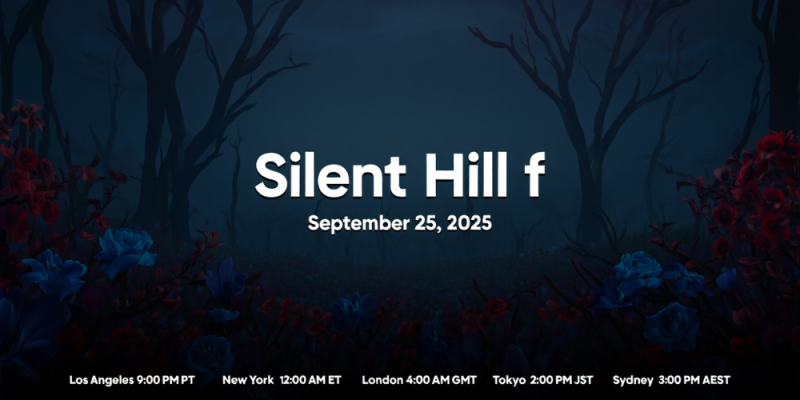
The final hours before launch always feel elastic: timelines bend, store pages phrase dates in odd ways, and friends in other regions claim they are already playing. The trick is realizing there are only two common release models and then confirming which one your platform follows for Silent Hill f. Rolling midnight means the game unlocks at 00:00 local time in each territory, while a simultaneous global launch uses a single UTC anchor that converts into different local hours worldwide. Both models are fine, but each demands a different plan for alarms, party invites, and content blocks. The safest path is to verify inside the ecosystem you will actually use, then build outward. Look for a storefront timer that reflects your account’s region, not internet rumors; check whether the official channels mention UTC or “midnight local time”; and remember that daylight saving shifts create silent offsets that confuse even veteran fans. Treat the countdown like a production schedule: verify the rule, pin your local conversion once, and set a reminder with a margin for day-one patches so you are not stuck staring at a locked button when the moment arrives.
Main Part
Start with platform truth sources. On PlayStation, the product page and your library tile show a countdown a few days ahead of release; that timer respects your account’s regional storefront and your console’s clock, so it is the most reliable indicator for when you can press Start. Xbox behaves similarly with a timer on the Store page and home tile that ties to the account region; if you recently changed regions, sign out and back in to refresh entitlements. On Steam, the Coming Soon page and Library entry display “Unlocks in” with automatic time zone handling based on your OS; it quietly accounts for daylight saving without you doing math. Epic Games Store mirrors this behavior with a label that flips to “Available” at unlock. If a countdown disappears, do not panic—stores sometimes flip assets during preload rollouts. Speaking of preloads, check storage needs early, because a full drive can block the download queue and make you miss the opening window. Enable auto-update, leave the console in rest mode, and on PC, pre-allocate space on the SSD you actually want to run from to avoid last-minute file moves that waste precious time.
Now handle time math with confidence. If the publisher states a UTC moment, convert once, write it down, and stop re-converting in chat. A practical tactic is to add a calendar event set to UTC in Google Calendar or Outlook; the app will show your correct local time even if daylight saving flips between now and launch. If there is no UTC anchor and the wording says “Available at 12:00 AM” on your local store page, assume rolling midnight and plan accordingly. Remember regional quirks: North America and much of Europe observe daylight changes on different weekends, while most of Asia-Pacific does not shift at all; this is the single biggest source of mistaken countdown screenshots. For groups spanning continents, align on UTC in your planning doc, then each person converts once to their city, e.g., Los Angeles, New York, London, Berlin, Tokyo, Sydney. Use a reputable converter rather than mental math when you are tired. Finally, set two alarms: one ten minutes before to power up, clear caches if needed, and one at the exact minute. If you stream, schedule your going-live time a few minutes after the theoretical unlock to absorb any store propagation delays.
Reduce friction before the clock hits zero. Preload as soon as it is offered, then validate the installation: on console, highlight the game and check the version number or update history; on PC, verify files to catch corrupted chunks. Sign into your platform account and any linked publisher account in advance, because two-factor prompts can eat your first minutes under stress. Update graphics drivers on PC and ensure shader precompilation is done if your platform supports it. Free up bandwidth by pausing other downloads on your network, and if you use Wi‑Fi on console, consider a temporary Ethernet connection for the unlock hour to avoid timeout loops. Prepare your in-game settings plan—brightness calibration for foggy scenes, audio mix preference for headphones, subtitle options—so you do not spend your first session in menus. If you want a clean first run, enable spoiler filters on social platforms and mute the obvious keywords. Finally, brief your friends: confirm who hosts voice chat, agree on a rendezvous time five minutes after unlock, and share your timezone-normalized schedule so nobody is guessing in the last stretch.
Conclusion
Here is the simple loop that keeps launch night calm and satisfying: verify the release rule on your platform, convert the time once using UTC if applicable, preload early, and stage your setup so there are no avoidable blockers. Treat the countdown like a checklist rather than a hype reel. If it is a rolling midnight release, your plan is local and simple; if it is a simultaneous global unlock, your plan is anchored to UTC and immune to rumor drift. Keep a small buffer for post-launch patches, store propagation, and one more reboot if an entitlement needs to refresh. Most importantly, communicate clearly with your squad: share the exact minute in local times, confirm who records or streams, and decide whether you explore at your own pace or speed straight to a particular objective. When you remove uncertainty, the anticipation feels better, the first session starts on time, and you get to savor the atmosphere without administrative noise. Set your reminders, finish your downloads, and step into Silent Hill f with confidence the moment the gate opens for your region.